Launch offerLifetime from $39.99, save up to $70See the offers
New Passwords, built in

For everything that matters most.

Sealed in your device. Yours alone.

Passports, IDs, health cards, wills, deeds, photos, and now your passwords. Encrypted by your device's hardware. Recoverable on your terms. Even we can't open it. That's the point.

iPhone · iPad · Mac · Android. Plans from $2.99/mo.

New in Kinship Vault

One app. Separate vaults.

Your passports, insurance, contracts, passwords, passkeys and 2FA codes no longer have to sit in one pile. Split them across vaults that lock separately, put the private ones behind a second password, and share a whole vault with the people you trust.

Your work logins never touch your personal vault.

Make a vault for each part of your life. Passports, insurance, contracts, passwords, passkeys, 2FA codes and photo albums live inside one vault only, and every vault is encrypted on its own with its own key sealed in your device's hardware.

1A real lock, not a folder. Separate database, separate keys. Opening Personal cannot expose a client contract or a work VPN login.
2AutoFill still reaches all of them. Every unlocked vault offers its logins and passkeys, each tagged with the vault it came from and unwrapped with that vault's own key.
3Smart Scan files it where it belongs. Scan a passport into Personal and an invoice into Work; each vault syncs on its own private iCloud stream and they never mix.
Your current vault becomes your first vault, in the same place, with the same key, the same 24-word phrase and the same AutoFill. Nothing about it changes.

Some documents deserve a second password.

Medical records, a will, the paperwork behind a difficult year. A sensitive vault has a lock of its own inside the app, plus a password that is the only way in on a new device or after a restore.

1A lock of its own, and no PIN. Opening the app or any other vault does not open this one, and where a normal vault will accept a short app PIN, a sensitive vault never will.
2It can never be shared. Not by accident, not by anyone. A sensitive vault is excluded from sharing by design.
3It comes back from recovery still sealed. Your 24-word phrase restores the documents, but only your password or its own recovery code opens them.
Keep it to a small, deliberate set of things; everyday passports and logins belong in your normal vault where they stay convenient. There is no backdoor, not even for us.

One Netflix login. Four people. No group chat.

Share a whole vault of logins, passkeys, 2FA codes and documents with your partner, your family or your team. Everyone AutoFills from it with their own Face ID or Touch ID. There is no shared master password, and no Kinship server in the middle.

1Invite by name, not by link roulette. Pick a contact, confirm with Face ID, then send their private invite or show a QR to scan in person.
2Everyone gets their own key. The vault key is wrapped to each person's device, so the passwords and passports in iCloud stay ciphertext the whole way.
3Removing someone rotates the key. It is re-wrapped to everyone who stays, so a former flatmate is locked out of the next password you change, not just hidden from a list.
Only the person who creates the vault needs the Shared plan. The people they invite join at no cost. Watch it on iPhone and Mac.
New in Kinship Vault

Your logins, now in the family vault.

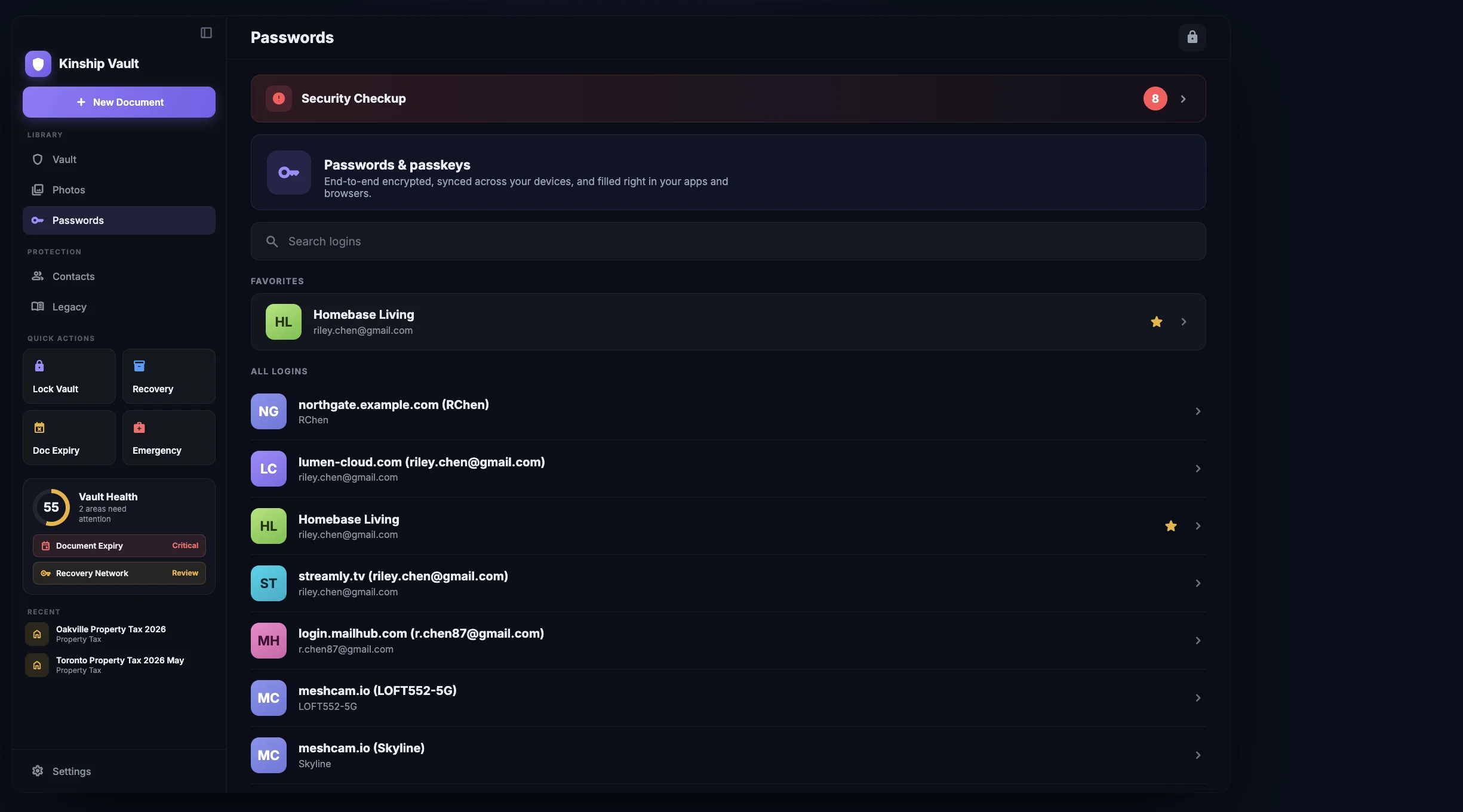
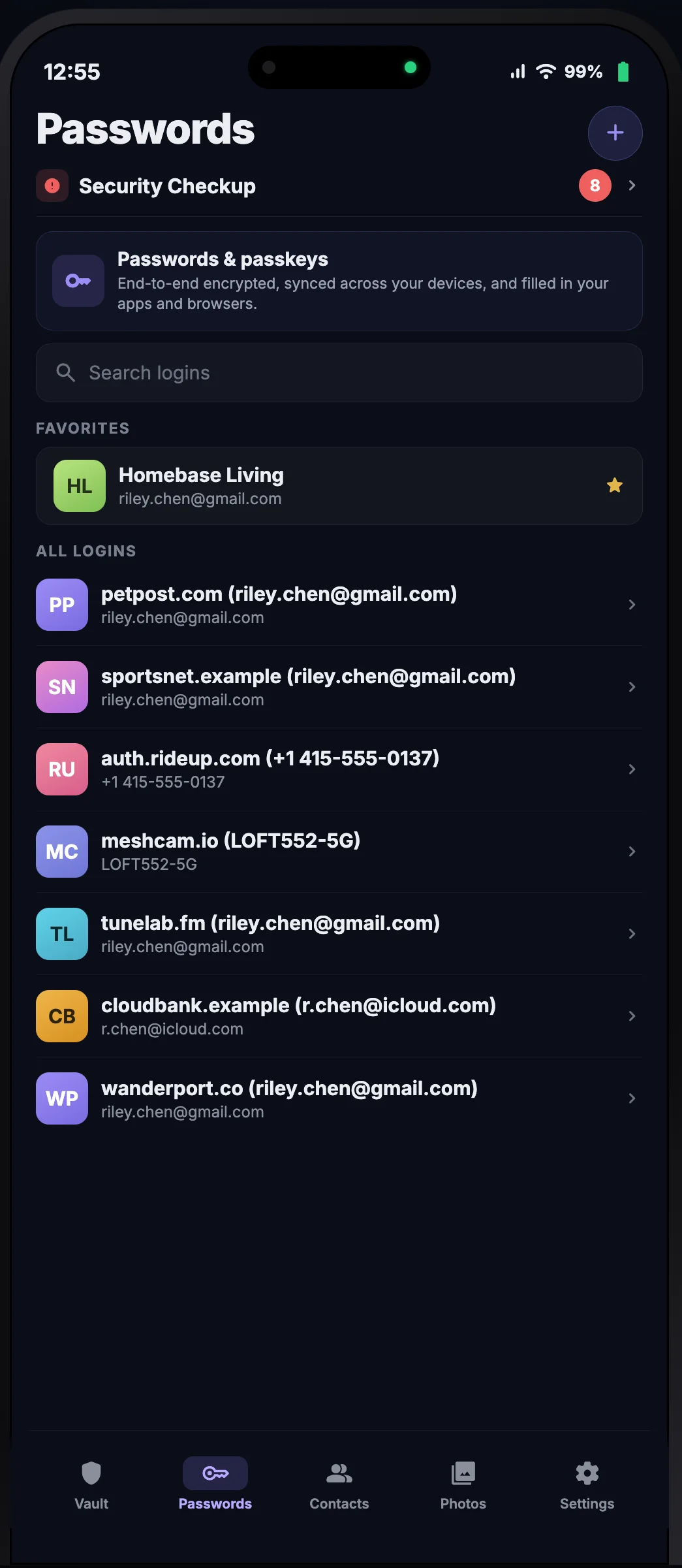
End-to-end encrypted passwords and passkeys, filled right in your apps and browsers. Sealed by the same hardware key that protects your documents, and covered by the plan you already have. On iPhone, iPad, and Mac.

Kinship Vault Passwords on macOS: favorites, all logins, and a Security Checkup banner in the sidebar app Kinship Vault Passwords on iPhone: a searchable list of logins with a Security Checkup shortcut

Passwords and passkeys

Every login, passkey, and 2FA code, encrypted with your key and synced across your devices. No separate account, and no master password for anyone to reset or leak.

Filled right where you need it

Set Kinship Vault as your AutoFill provider and it drops the right login into your apps and browsers, system-wide. Passkeys sign you in with Face ID, Touch ID, or your Mac.

Codes and a generator, built in

Keep one-time 2FA codes beside the login and fill both together. Generate strong, unique passwords, and see their real strength measured on device.

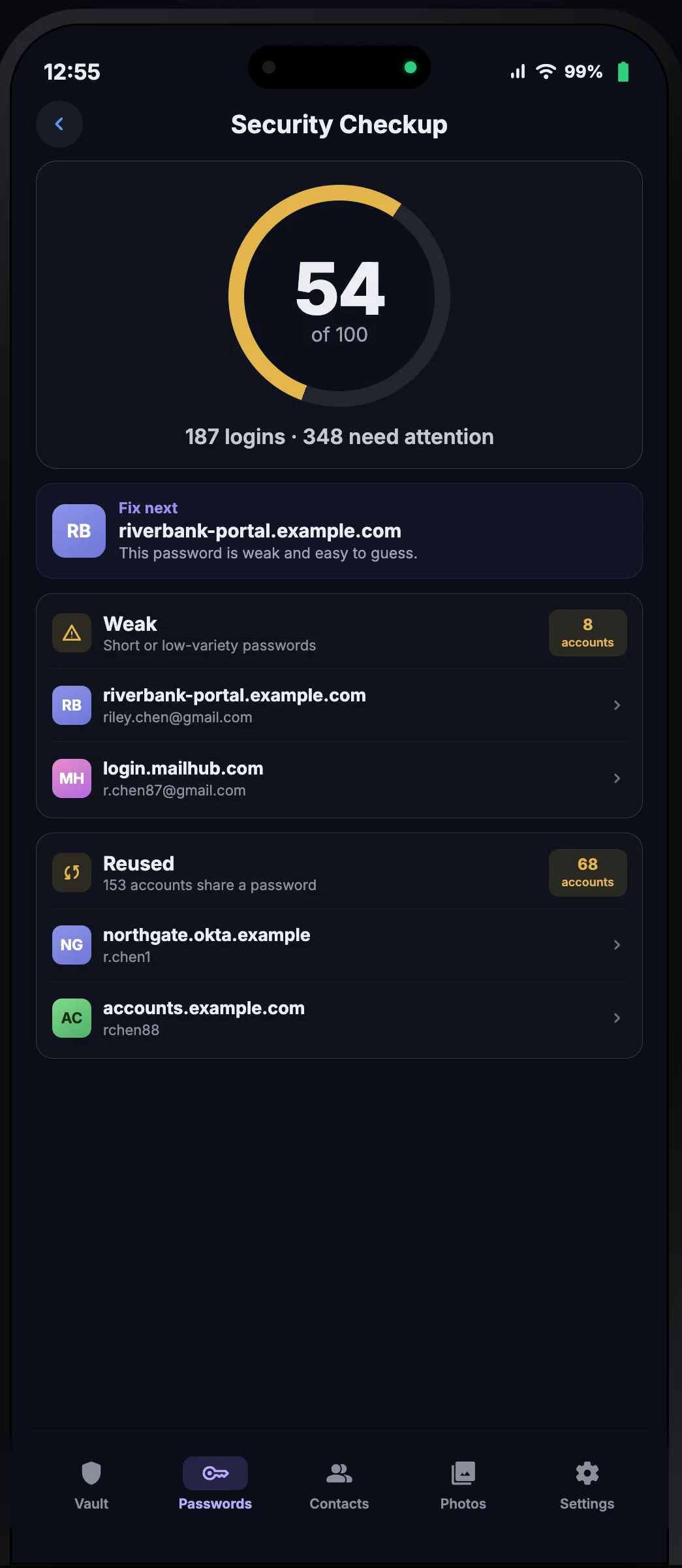
Security Checkup on iPhone: a 54 of 100 score with weak and reused passwords grouped for review

Security Checkup

See every weak, reused, and risky password.

A private, on-device checkup scores your logins and shows you what to fix first: weak, reused, old, and, when you allow it, breached passwords, each with a clear next step.

The checks run on your device. In Strict Offline mode even the breach check stays off, and the weak, reused, and old checks still work.

See it in action

Watch it work.

A run through Kinship Vault the way you'd actually use it, scanning documents, organizing them, and sealing everything behind Face ID. Every bit of it happens on your device.

Now on Mac

A real Mac app. Not a stretched iPad app.

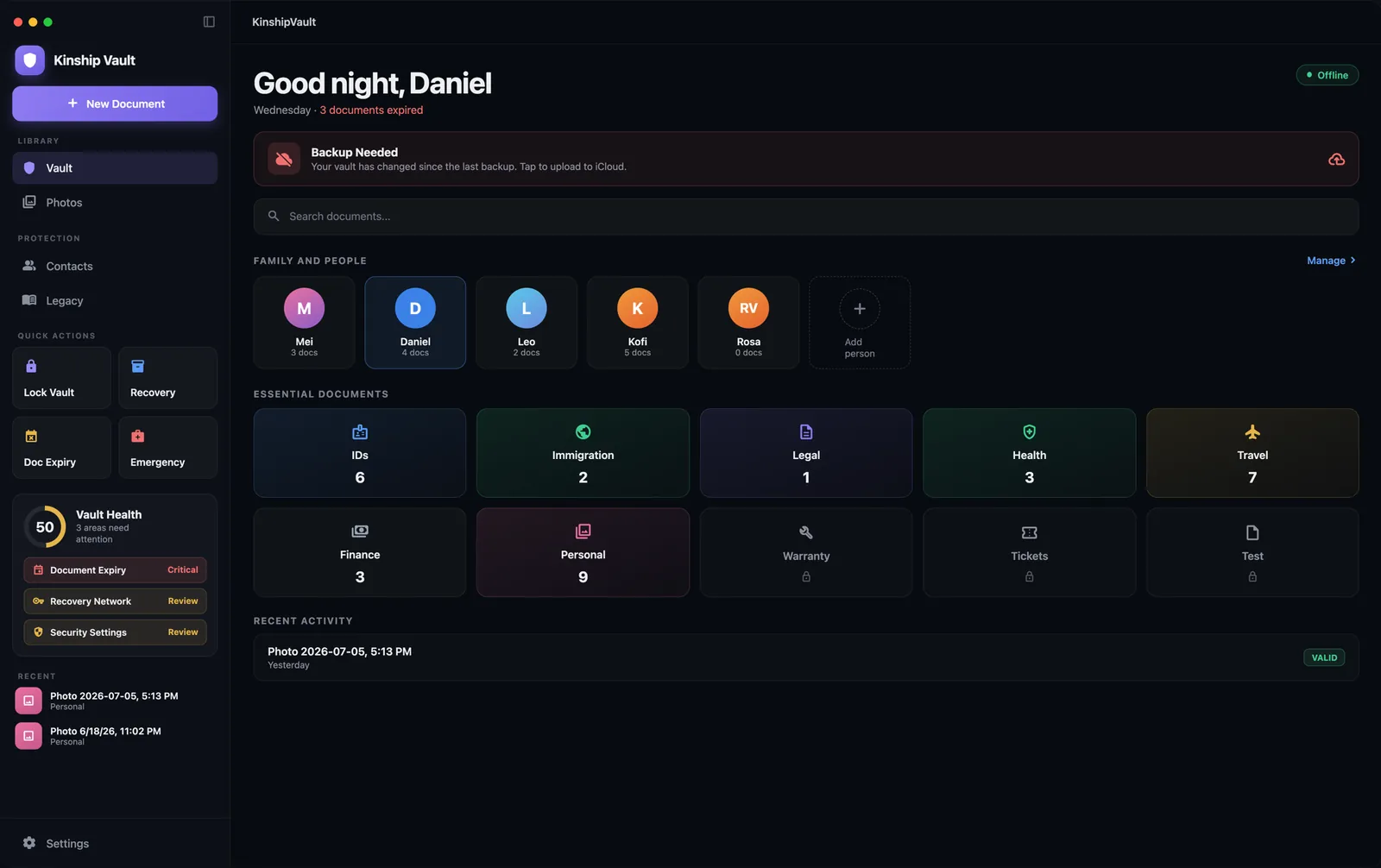
Built natively for macOS, with a proper sidebar, the menu bar, keyboard shortcuts, and drag-and-drop. The same vault you carry in your pocket, sitting where you actually do the paperwork.

Kinship Vault on macOS: sidebar with vault health, essential document categories, and family members

Built for the desktop

A real sidebar and split view. ⌘N for a new document, ⌘L to lock the vault. Mac-style preferences. Drag a file onto the window and it's in.

Light or dark

Follow the system, or pin it. The appearance changes; nothing about how the vault protects you does.

One vault, every device

Pair your Mac by scanning the QR from your iPhone. The key passes between the two machines directly, never through us. One purchase covers all of them.

Now on Android

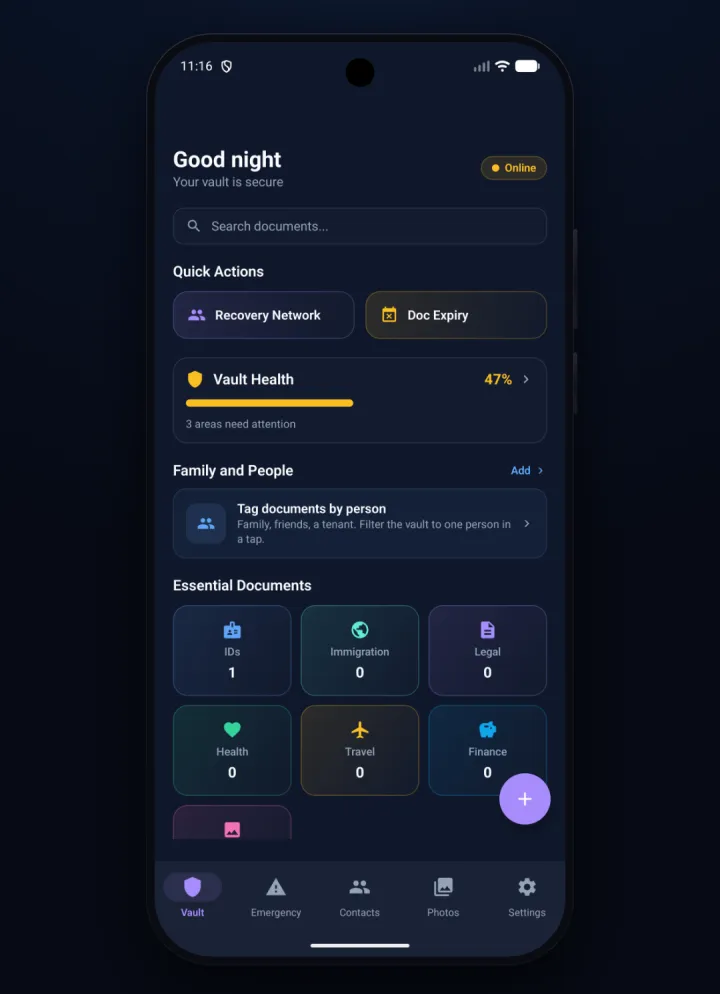
The whole vault, now on Android.

Scan with the camera, seal it with on-device encryption, and open the vault with a fingerprint or a PIN. The same private vault, on Google Play.

Kinship Vault on Android: the vault home with quick actions, vault health, family, and essential document categories

Scan, then it's sealed

Point the camera at a passport or ID. On-device recognition reads the fields across 100+ document types and encrypts the result before it touches storage. Nothing is uploaded.

Fingerprint, face, or PIN

Unlock with biometrics or a PIN. No account, no password to reset, and no key on our side for anyone to ask us for.

Everything came along

Recovery Network, Vault Health, Emergency Mode, and the encrypted photo vault, all here. Encrypted backup goes to your own Google Drive.

What it does

Built for the things you can't afford to lose.

Reads them, watches their dates, and seals them behind hardware encryption. No byte ever leaves your device.

📄

It reads what you already carry.

Passports, driver's licences, health cards, tax forms, wills, all automatically recognized across 100+ document types worldwide. Photos and personal scans come along too, encrypted the same way. Nothing leaves your device.

🔑

Recovery, on terms you decide.

A passphrase you write down once. A circle of people you'd trust with your life. A quiet safety net for the people who'd need it most. Choose what fits, pick any, all, or none.

It watches the dates so you don't have to.

Calm reminders 90, 30, 7, and 1 day before any document expires. Renewals never sneak up on you, and no third party ever sees the dates.

🤐

Quiet by design. Even from us.

No analytics. No telemetry. No "we collect anonymized data." Your decryption stays on your device, always. We don't know who you are, and we couldn't read your vault if we wanted to.

"Recovery is cryptographic, not corporate."

There's no "email reset" link, because there's no company holding your key. Your decryption stays on your device, sealed by the Secure Enclave. We literally cannot unlock your vault, and we built it that way on purpose.

How the keys work

The key is yours. Literally.

Most apps protect your data with a password they can help you reset. Kinship Vault's root secret is not a password at all. It's a hardware-sealed random key that only your device can produce.

1

The key is born on your device.

A 256-bit master key, either 32 random bytes from your device's secure random generator, or rebuilt from your BIP39 recovery phrase. That's 256 bits of real entropy, not a password someone could guess. There is nothing to brute-force.

2

It's sealed in hardware.

The master key is wrapped by your device's Secure Enclave using ECIES, a hardware key that physically cannot leave the chip. That's the iPhone, the iPad, and Apple silicon Macs alike. It's unwrapped only after Face ID or Touch ID. At rest, the key is hardware-sealed.

3

Every document gets its own key.

From that master key, Kinship Vault derives a separate key for each document using HKDF (HMAC-SHA-256). Each file is then encrypted on its own with AES-256-GCM.

4

No key ever leaves your device.

None of these keys are sent to a server, ours or anyone else's. A data breach or a legal request on our side turns up nothing, because there is no key on our side to hand over.

A closer look

Quietly serious about the things you keep.

From the first time you open it, to the moment someone you trust steps in.
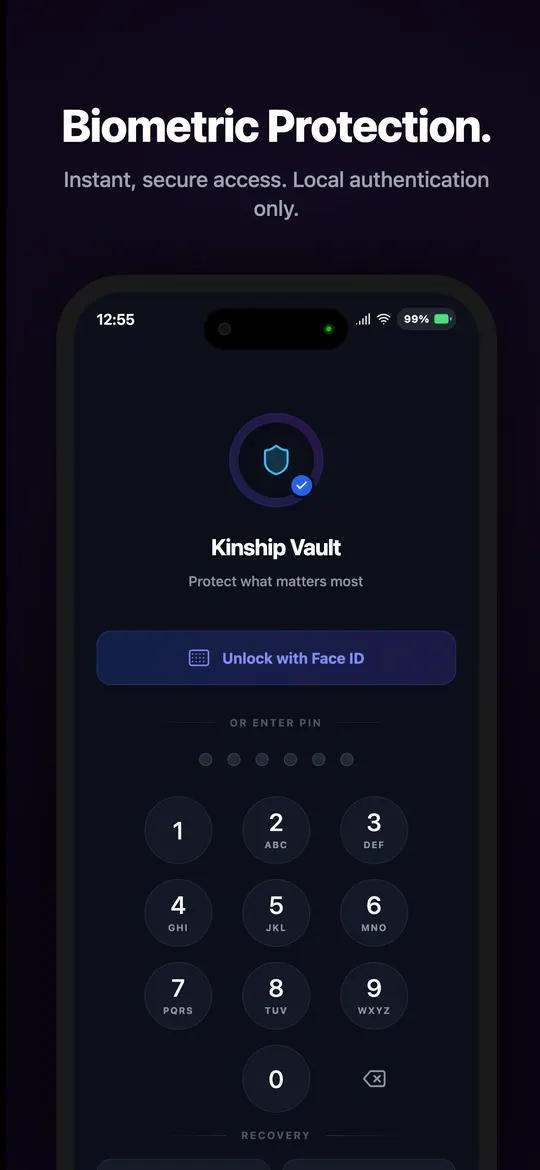
Kinship Vault biometric unlock screen with Face ID and PIN keypad

Opening it

The only person who can open it is you.

Face ID, Touch ID, or a 6-digit PIN. On a Mac, Touch ID or your login password. Authentication happens entirely on your device. There's no Kinship Vault account, no password reset, no email recovery link.

If the device is in your hands and your face is in front of it, the vault opens. Anything less, it stays sealed.
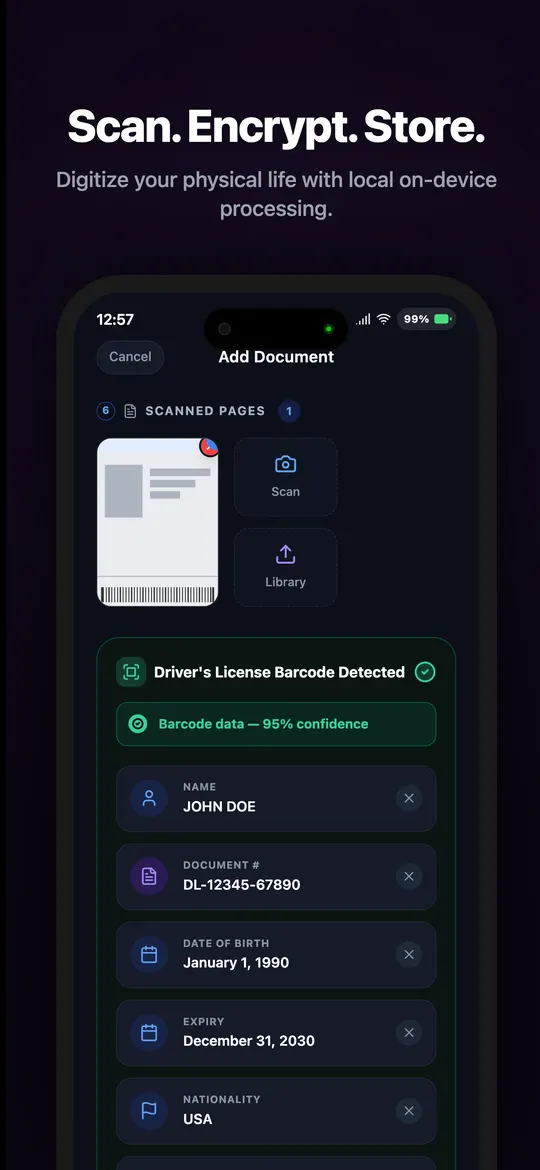
Document scanner extracting fields from a driver's license

Filling it

It reads the documents you already carry.

On iPhone and iPad, point the camera at a passport, driver's licence, health card, or tax form. On the Mac, drag the file onto the window. Either way the app recognizes the structured fields automatically across 100+ document schemas worldwide, and encrypts everything before it touches storage. Photos and personal scans come along too.

Nothing is sent to a server. Nothing leaves your device.
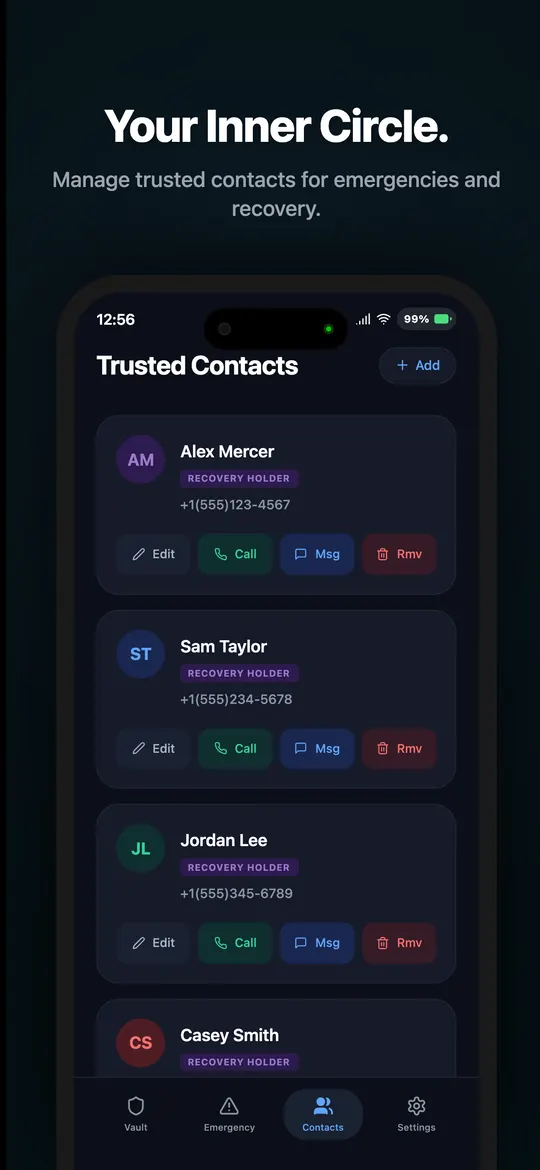
Trusted contacts list with recovery holders

The people you'd choose

Your inner circle, where it belongs.

The people you'd want to step in if your phone disappeared, or if something happened to you. Each holds an encrypted recovery piece, a sealed envelope they can return only when you ask for it.

They never see what's inside the vault. Just a fragment of a key that, on its own, opens nothing.
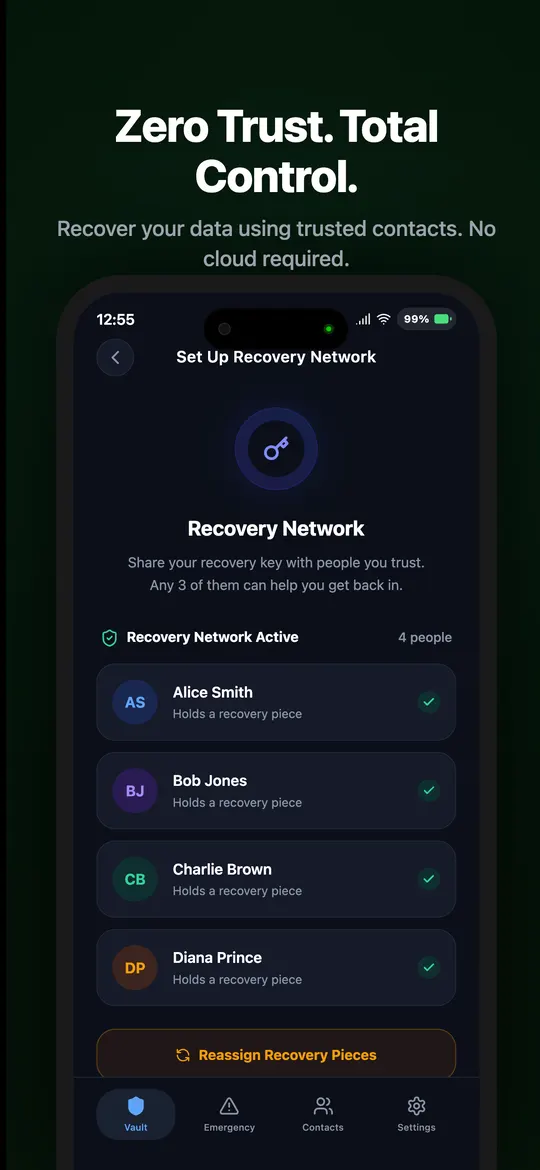
Recovery network screen showing four trusted contacts holding shards

Getting back in

Recovery, written by you. Held by them.

If you lose your phone, three of your trusted people can hand back their pieces and you're in. No cloud download. No support ticket. No password-reset email that could be intercepted.

Recovery happens entirely between you and the people you've already chosen, exactly the way you set it up.
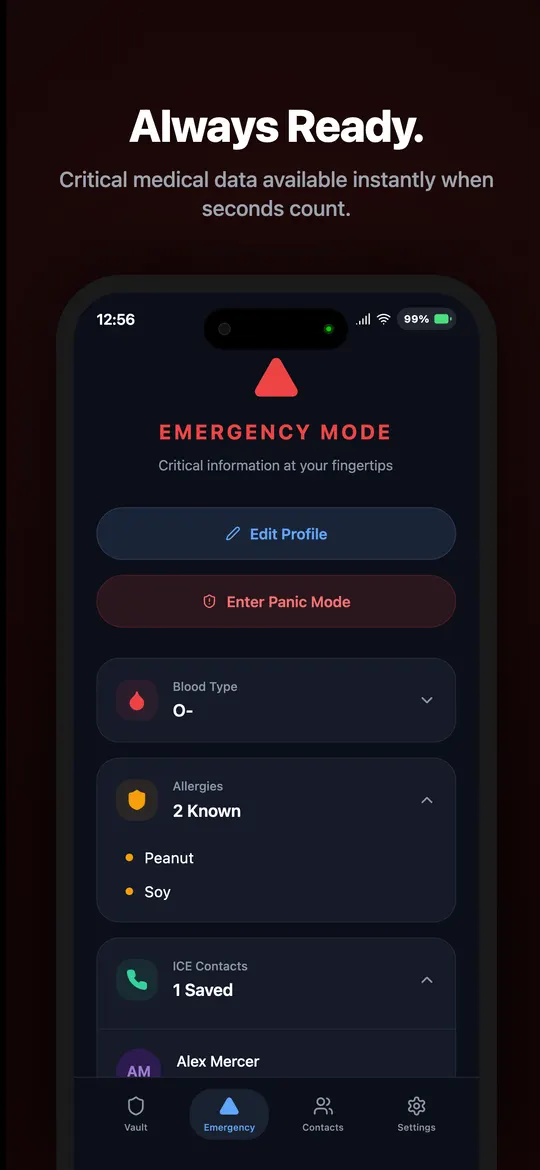
Emergency mode showing blood type, allergies, and ICE contacts

When seconds count

Calm and ready, without unlocking everything.

Blood type, allergies, ICE contacts, travel ID. Readable in one tap, even when the vault is locked. Available the moment you (or someone helping you) needs them.

The rest of what you're keeping safe stays exactly where it is. Sealed.

Across your devices

Bring it with you. Without breaking the seal.

Open the same vault on your iPhone, your iPad, and your Mac. The key passes between the two devices in person, sealed in their secure hardware, never through us.

Bring My Vault
Open the same vault on another device, with no server in the loop
Step 1 of 4
Linking my iPhone to a
Step 1 of 4
9:41100%
Unlock & Recovery
Personal vault
Change Unlock PINUsed on this device
Recovery Passphrase24 words · saved
Recovery Network4 trusted contacts
Link a New DeviceShow a one-time code
iPhone
Nothing sent yet
MaciPad, still locked

On the iPhone that already holds the vault, tap Link a New Device. It sits right next to your existing recovery options.

Step 2 of 4
9:41100%
Link a New Device
Confirmed with Face ID
This code is the key. Hides in 60s
iPhone
On screen only
MaciPad, still locked

After Face ID, the iPhone shows a single QR that encodes the device key. The warning is loud on purpose: that code is the key, and it hides itself after 60 seconds.

Step 3 of 4
9:41100%
Link a New Device
Hold it up to the other device
This code is the key. Hides in 41s
iPhone
Camera to screen
No server in between
Bring My Vault
Point the camera at the code on your iPhone
Bring My Vault
Point the camera at the code
MaciPad, scanning

On the MaciPad, open Bring My Vault from the lock screen and point its camera at the iPhone. The handoff is device to device. Nothing passes through a server.

Step 4 of 4
9:41100%
Personal
28 documents · 64 logins
PassportExpires Mar 2029ID
icloud.comPasskey · AutoFill readyLOGIN
Bank · 2FA348 219 · 22sCODE
iPhone
Same vault
Same key
Personal
28 documents · 64 logins
PassportID
icloud.comLOGIN
Personal
28 documents · 64 logins
PassportID
icloud.comLOGIN
MaciPad, unlocked

The MaciPad rebuilds the master key inside its own secure hardware, pulls the encrypted backup from your iCloud, and opens the same vault. Same data, same security model, two devices.

Pricing

Two plans. Every Apple device.

Solo unlocks everything for your own vaults. Shared adds vaults you co-own with the people you invite. Both work across iPhone, iPad, and Mac on the same Apple Account.

Passwords, passkeys and 2FA codes are free and unlimited, along with your first 10 documents. Upgrade whenever you're ready.

The prices below are for iPhone, iPad, and Mac. The Android app is a separate purchase with its own pricing on Google Play.

Solo
$19.99/yr

Just $1.67/mo, billed yearly. Save 44% vs monthly. Everything Kinship Vault does, for your own vaults.

Monthly$2.99/mo
Lifetime$59.99$39.99 once
Get Solo
Launch offer

Pay once. Yours forever.

Both lifetime plans are discounted while vaults launch. One payment, nothing to renew, and every update after it included.

Each link opens the App Store with the code already applied, on the Apple Account you are signed in with. Lifetime is a one-time purchase and unlocks iPhone, iPad and Mac.

Free, no account, no card
Unlimited passwords, passkeys and 2FA codes: no cap, ever
AutoFill everywhere: iPhone, iPad, Mac, and Safari, Chrome, Edge and Brave
Security Checkup: weak, reused and breached logins, checked on your device
10 documents: filed under any of the 7 built-in categories
Encrypted backup and restore: to your own iCloud, or a file you keep
Recovery passphrase: 24 words that bring the vault back on a new device
Both plans add
Unlimited documents: not just 10
Multiple vaults: keep personal and work separately keyed
Sensitive vaults: a second wall, with its own password
Smart Scan & OCR: auto-fill 100+ document types, past the free 10
Custom categories and record types: your own, beyond the 7 built in
Encrypted photo vault: albums and personal scans, sealed the same way
Recovery Network: split your key across trusted people
Expiry alerts and people tagging: never miss a renewal, tag beyond the first 2 people
Shared adds
Shared vaults: share a whole vault, logins, documents and notes
Invite by name: pick a contact, confirm with Face ID, send a link or show a QR
Free for the people you invite: only the owner needs the plan
Remove access anytime: the vault key rotates, not just the list
Everyone uses their own Face ID: no shared master password
Still end-to-end encrypted: the key is wrapped to each member's device

One purchase unlocks iPhone, iPad, and Mac. Only the person who creates a shared vault needs the Shared plan; the people they invite join at no cost. Payment is charged to your Apple Account at confirmation. Subscriptions auto-renew unless canceled at least 24 hours before the end of the current period; manage or cancel anytime in Settings. Lifetime is a one-time purchase. Prices are in US dollars and may differ by region. The Android app is sold separately on Google Play.

Questions

The things people ask first.

How much does it cost?
The password manager is free and unlimited, and so are your first 10 documents. Paying unlocks the rest. On iPhone, iPad, and Mac there are two plans. Solo unlocks everything for your own vaults: $2.99/month, $19.99/year (that's $1.67/month, 44% less than monthly), or $59.99 once for Lifetime, currently $39.99 while vaults launch. Shared adds vaults you co-own with people you invite: $4.99/month, $34.99/year ($2.92/month, 42% less), or $129.99 once, currently $59.99. Whichever you pick unlocks the same app across all three devices. The Android app is priced separately on Google Play. See the full breakdown.
Does Kinship Vault include a password manager?
Yes. Passwords are built in on iPhone, iPad, and Mac. Store logins, passkeys, and one-time 2FA codes, all end-to-end encrypted with the same key that seals your documents and synced across your devices. There's no separate account and no master password to reset. All of it is free and unlimited, on every plan and on none. See how it works.
Can it fill my passwords in my apps and browsers?
Yes. Turn Kinship Vault on as an AutoFill provider in your device settings and it fills logins and passkeys system-wide, in your browser and inside your apps, on both iPhone/iPad and Mac. Every fill is unlocked with Face ID or Touch ID, so nothing is filled without you.
What is the Security Checkup?
A private, on-device review of your logins. It scores them out of 100 and groups what to fix first: weak, reused, old, and, if you allow an online check, breached passwords. The breach check uses k-anonymity, so your passwords are never sent anywhere, and it is off entirely in Strict Offline mode while the weak, reused, and old checks keep running. See the checkup.
Are passwords on Android too?
Not yet. The password manager is on iPhone, iPad, and Mac today. The Android app has everything else, the same on-device encryption, scanning, Recovery Network, and photo vault, and passwords are on the way.
Can Kinship Vault read my documents?
No. Your documents are encrypted with a key that is generated and sealed on your device and never sent to us. We hold no copy of your key, so there is nothing on our side that could decrypt your vault, even if someone asked us to.
What encryption do you actually use?
Your root secret is not a password, it's a hardware-sealed random key. A 256-bit master key is created on your device, either 32 random bytes from the operating system's secure random generator or rebuilt from your BIP39 recovery phrase, which is 256 bits of real entropy and not something that can be brute-forced. That master key is wrapped by your device's Secure Enclave (ECIES, a hardware key) and unwrapped only after Face ID or Touch ID. That is true on iPhone, iPad, and Apple silicon Macs alike. From it, Kinship Vault derives a separate key for every document using HKDF (HMAC-SHA-256), then encrypts each file with AES-256-GCM. There is no master password, so there is nothing for anyone to guess or for us to reset.
What happens if I lose my phone?
You set recovery up in advance. Write down a recovery passphrase, or split a recovery key across people you trust so a few of them together can help you back in. Recovery happens between you and the people you chose, with no cloud download and no reset email.
Can I use the same vault on my iPhone, iPad, and Mac?
Yes. On the device that already has your vault, open Settings and tap "Link a New Device." A QR appears on screen for 60 seconds. On the other device, open Kinship Vault, choose "Bring My Vault," and point its camera at the first device. A Mac uses its built-in camera for exactly this. The key passes directly between the two devices through that on-screen code, and your documents come down from your own encrypted iCloud backup and are decrypted only on the second device. Nothing about the handoff routes through our servers. See the four-step walkthrough.
Do I pay again for the Mac app?
No. It's one universal purchase. Whatever you've bought, a subscription or Lifetime Premium, carries across iPhone, iPad, and Mac on the same Apple Account. Download it on the Mac and sign in as usual; there is nothing else to buy.
Is the Mac app just the iPad app in a window?
No. It's a native macOS app, built with SwiftUI for the Mac, requiring macOS 14 or later. It has a real sidebar and split view, menu bar commands with keyboard shortcuts, a Mac-style preferences window, drag-and-drop import, and a light, dark, or system appearance. See the Mac app.
What's different about the Mac version?
Three things, and we'd rather you heard them from us. Macs have no document-scanning camera flow, so instead of pointing a camera at a passport you drag the file in, or pull it from Photos or Files; the same on-device recognition runs either way. macOS gives apps no way to block screenshots, so when the Mac is the device showing a pairing QR, that QR is not screenshot-protected the way it is on iOS; the app warns you on screen. And the Dead Man's Switch runs on iPhone and iPad only, because it depends on check-in reminders a desktop app can't reliably send. Everything else, including the encryption, is the same. The full picture is on the Mac page.
Is Kinship Vault on Android?
Yes. There's a native Android app on Google Play, with the same on-device encryption, camera scanning, Recovery Network, and encrypted photo vault. Two things to know: it's a separate purchase from the Apple app (Google and Apple keep purchases inside their own stores), and an Android vault is its own vault, with no live sync to an iPhone, iPad, or Mac today. See the Android app.
Do my documents get uploaded anywhere?
Not unless you choose to. Kinship Vault works fully offline. If you turn on backup, it is encrypted with your key and stored in your own iCloud, on your terms.
Is there an account or password to create?
No account, no password, no email. The app is tied to your device and your biometrics, which also means there is no account for anyone to phish or breach.

Yours alone. By design.

No middleman. No analytics. No password-reset email that could compromise everything you cared about protecting. Just the documents you keep close, the people you trust, and the devices already in your pocket and on your desk.